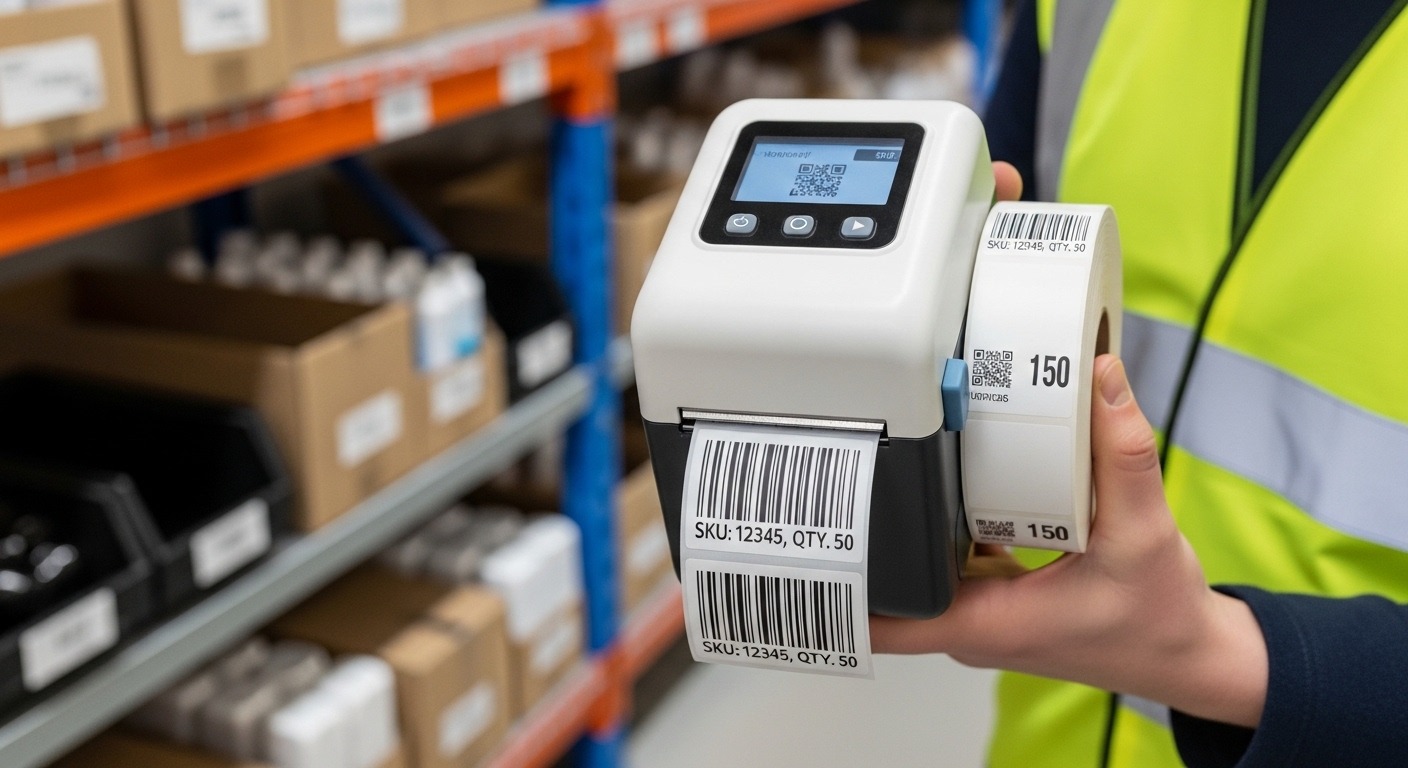
A portable barcode label printer is a compact, battery-powered device that prints barcode labels on demand. It connects to mobile devices or computers via Bluetooth or Wi-Fi and is used to support warehouse labeling and real-time tracking within an inventory management system.
Inventory errors cost businesses more than most owners realize. A study by the IHL Group found that inventory distortion—caused by stockouts and overstocks—cost retailers globally over $1.7 trillion annually. Small operational mistakes compound over time. Misplaced stock. Incorrect counts. Delayed fulfillment.
This is where portable barcode label printers change the workflow.
Instead of printing labels in a central office and walking back to the warehouse floor, teams generate labels at the point of activity. Receiving dock. Storage aisle. Packing station. The result is faster warehouse labeling, fewer manual entry errors, and cleaner data inside your inventory management system.
This guide explains how to use a portable barcode label printer step by step. You’ll learn setup, integration, labeling strategy, and best practices based on real operational use cases.
How Does a Portable Barcode Label Printer Work?
A portable barcode label printer works by generating scannable barcode labels from inventory software and printing them instantly using thermal technology.
Most portable printers use direct thermal or thermal transfer printing. No ink cartridges. No complex setup. Just load label rolls, connect to your system, and print.
Core Components
- Battery-powered printer
- Thermal print head
- Label roll (paper or synthetic)
- Wireless connectivity (Bluetooth/Wi-Fi)
- Inventory management system integration
When a new SKU is created or stock is received, your inventory management system generates a barcode (such as Code 128 or QR code). The printer receives the data and prints the label instantly. Staff attach the label to products, bins, or pallets.
The barcode stores data such as SKU number, batch code, location, or expiration date. When scanned, the system updates stock levels in real time.

Why Should You Use a Portable Barcode Label Printer in a Warehouse?
Portable barcode label printers improve accuracy, speed, and visibility in warehouse labeling operations.
Manual labeling increases the risk of mismatched SKUs. Fixed printers slow down operations because workers must walk back and forth.
In a 2023 warehouse efficiency case study published by Zebra Technologies, distribution centers that implemented mobile barcode printing reduced labeling errors by up to 30% and improved receiving time by 25%.
Key Benefits
- Real-time label printing at receiving docks
- Reduced human error
- Faster stock allocation
- Improved cycle counting accuracy
- Better integration with inventory management systems
If your warehouse labeling process involves handwritten tags or delayed system updates, you are likely losing both time and accuracy.
How Do You Set Up a Portable Barcode Label Printer?
Setting up a portable barcode label printer involves charging the device, loading labels, installing drivers or apps, and connecting it to your inventory management system.
Step 1: Charge and Prepare the Printer
Fully charge the battery. Insert the correct label roll. Ensure labels match your required size (for example, 2×1 inch SKU labels).
Step 2: Install the Software
Download the printer’s driver or mobile app. Many printers support Android, iOS, and Windows.
Step 3: Connect via Bluetooth or Wi-Fi
Pair the device. Test the connection by printing a sample label.
Step 4: Integrate with Your Inventory Management System
Connect the printer to your warehouse management software. Most systems allow direct label template creation.
Step 5: Create a Label Template
Include:
- SKU number
- Product name
- Barcode type
- Warehouse location
- Date or batch code
Run a test print. Scan it. Confirm data syncs correctly.
How Do You Use a Portable Barcode Label Printer for Warehouse Labeling?
Use portable barcode label printers at receiving, storage, picking, and shipping points to ensure accurate warehouse labeling.
1. Receiving Inventory
When goods arrive, scan supplier paperwork. Generate internal SKUs if needed. Print labels immediately and attach them before storage.
2. Storage Labeling
Print bin or shelf location labels. Assign barcode IDs to racks and pallets.
3. Picking and Packing
Generate shipping labels or replacement SKU labels if damaged.
4. Returns Processing
Print new barcodes if returned items need reclassification.
This ensures your inventory management system reflects physical stock at all times.
How Does It Improve an Inventory Management System?
Portable barcode printing strengthens data accuracy and reduces manual entry errors inside an inventory management system.
Inventory systems rely on clean input. If labels are incorrect, the system becomes unreliable.
| Without Portable Printing | With Portable Printing |
|---|---|
| Delayed labeling | Instant on-site labeling |
| Manual data entry errors | Barcode scanning accuracy |
| Stock mismatches | Real-time updates |
| Slow receiving process | Faster dock-to-stock time |
Accurate warehouse labeling ensures that when a product is scanned, your system reflects correct stock levels, reorder points, and fulfillment status.
What Are Best Practices for Effective Warehouse Labeling?
Effective warehouse labeling requires standardized formats, durable materials, and consistent scanning protocols.
- Use consistent barcode symbology (e.g., Code 128).
- Choose durable labels for cold storage or outdoor use.
- Standardize label placement on products.
- Train staff on scanning procedures.
- Perform routine audit checks.
In one mid-sized logistics company case, switching to standardized portable barcode labeling reduced annual inventory write-offs by 18% within 12 months.
What Common Mistakes Should You Avoid?
Avoid poor label quality, inconsistent formats, and lack of system integration.
- Using low-quality labels that fade
- Printing without verifying barcode readability
- Failing to sync printer templates with system updates
- Ignoring battery management
- Overcomplicating label designs
Keep labels simple. Clean barcode. Essential data only.
How Do You Maintain a Portable Barcode Label Printer?
Regular cleaning, battery care, and firmware updates keep your portable barcode label printer reliable.
- Clean the thermal print head weekly
- Store in dry conditions
- Replace worn label rolls promptly
- Update firmware regularly
Downtime during peak warehouse operations can delay fulfillment. Preventive maintenance is cheaper than emergency replacement.
Conclusion: Is a Portable Barcode Label Printer Worth It?
Inventory management depends on accurate data. Accurate data depends on reliable labeling.
A portable barcode label printer reduces labeling errors, speeds up warehouse workflows, and strengthens your inventory management system. It brings labeling to the point of action instead of forcing workers to adapt to static systems.
If your warehouse still relies on manual tags or centralized printing, inefficiencies are likely hiding in plain sight.
Take action now. Audit your current warehouse labeling process. Identify delay points. Test a portable barcode label printer in one operational zone. Measure improvements in accuracy and processing time. Small changes in labeling can lead to measurable gains in profitability.
Frequently Asked Questions (FAQs)
1. What is the best barcode type for warehouse labeling?
Code 128 is widely used in warehouse labeling because it supports alphanumeric data and has high density. It works well within most inventory management systems.
2. Can portable barcode label printers integrate with cloud inventory software?
Yes. Most modern printers connect via Bluetooth or Wi-Fi and integrate with cloud-based inventory management systems through apps or APIs.
3. Are thermal barcode labels durable?
Direct thermal labels are suitable for short-term use. Thermal transfer labels are better for long-term durability and harsh warehouse conditions.
4. How much can barcode labeling reduce inventory errors?
Studies show barcode systems can reduce human data entry errors by up to 90% compared to manual processes.
5. Do small businesses need portable barcode printers?
Yes. Even small warehouses benefit from improved stock accuracy, faster receiving, and better visibility within their inventory management system.
6. How often should barcode labels be replaced?
Replace labels when damaged, faded, or unreadable. Regular audits help maintain scanning accuracy.
Related Topic: How to Prevent Heatstroke in Dogs Naturally
Read Next: How to Choose the Best Smart Thermometer for Smoking Meat






Post Comment